
Independent guide · Download served by GitHub
ViGEmBus Download for Windows 10 & 11
This ViGEmBus download page provides version 1.22.0, the final installer published by Nefarius for Windows 10 and Windows 11. The button below points directly to the verified official GitHub release asset; this site does not repackage or mirror the driver.
- One installer for x86, x64 and ARM64 systems
- Production-signed driver from the original publisher
- No account, custom downloader or bundled installer
ViGEmBus is retired, not actively maintained
The original project entered end of life in 2023 and the GitHub repository is archived. Version 1.22.0 removes the legacy updater, but it does not restart development or promise future Windows compatibility.
Release facts
Know exactly what you are downloading
Download pages are easy to imitate, so the useful details should be visible before you run an installer. These values were checked against the Nefarius GitHub repository and release API on July 23, 2026.
The final public ViGEmBus setup release.
Release date shown by the official GitHub record.
The current release is an EXE, not the older MSI naming used in legacy guides.
One all-in-one installer contains the supported Windows builds.
The source project publishes its license in the repository.
Existing downloads remain available, but updates have ended.
Driver purpose
What does ViGEmBus do?
ViGEmBus is a Windows kernel-mode driver that lets another application create a virtual game controller. A controller utility sends input through the driver, Windows exposes a familiar Xbox 360 or DualShock 4 device, and games can read that virtual device without application-specific hooks.
The driver has no normal desktop interface. Installing ViGEmBus by itself does not create a configuration app or instantly remap a controller. It is infrastructure used by software such as DS4Windows, BetterJoy, XOutput and other gamepad tools. If one of those applications reports that ViGEmBus is not installed or running, the driver is the missing dependency rather than the program you interact with every day.
Because it runs in the Windows kernel, source matters. Use the publisher's GitHub release, keep only one current bus entry installed, and avoid third-party driver bundles that obscure the file name or publisher.
Read the complete ViGEmBus explanationQuick installation
Install ViGEmBus in four checks
Close controller utilities before installation, use the verified all-in-one setup, and confirm the device afterward. The final release notes say an in-place upgrade may require running setup twice.
- 1
Download the official setup
Use the GitHub asset named ViGEmBus_1.22.0_x64_x86_arm64.exe. Do not substitute a similarly named file from a driver mirror.
- 2
Run it as your Windows account
Open the EXE, approve the Windows administrator prompt, review the publisher information, and follow the installer. You do not need to select x64 or ARM64 manually.
- 3
Repeat once when upgrading
If an older installation remains after the first pass, run the same setup a second time. This behavior is documented in the official 1.22.0 release notes.
- 4
Verify the bus in Device Manager
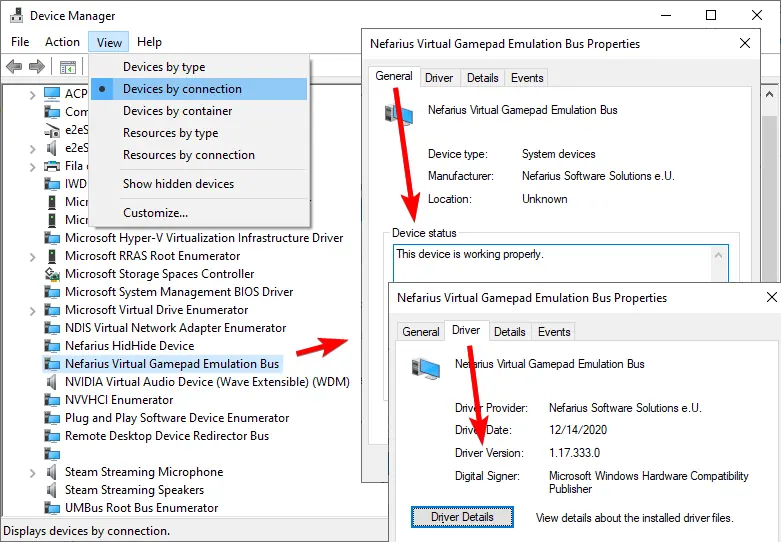
Switch Device Manager to Devices by connection and look for Nefarius Virtual Gamepad Emulation Bus. Its General tab should report that the device is working properly.
Source and signature
How to verify a ViGEmBus download
A safe download decision starts with provenance, not a generic green badge. The expected destination is the `nefarius/ViGEmBus` GitHub repository, the release tag is `v1.22.0`, and the asset name includes all three supported architectures. The official README describes the setup as production-signed binaries for Windows 10 and 11.
Before running the installer, open File Properties, inspect Digital Signatures when available, and confirm the signer identifies Nefarius Software Solutions. Windows SmartScreen behavior can vary with reputation and local policy, so a prompt alone is not proof that a file is malicious or trustworthy. The source URL, exact file name and signer should agree.
- Host is github.com and repository owner is nefarius
- Release tag is v1.22.0 and asset is the all-in-one EXE
- Publisher/signature details identify Nefarius Software Solutions
- No wrapper downloader, password-protected archive or extra installer
Common next steps
Fix ViGEmBus installation and detection problems
Most problems fall into three groups: the dependency is missing, Windows has multiple old bus entries, or the controller application needs to be restarted after a clean installation.
“ViGEmBus is not installed or running”
Diagnose the fatal gamepad-support message in DS4Windows, Apollo and similar controller software.
Fix the error → Installation checkConfirm the driver is installed
Use Apps, Device Manager and device status to distinguish a missing driver from an application problem.
Check the driver → Clean removalUninstall or repair old copies
Remove the normal app entry first, reboot, and only use deeper cleanup when duplicate device entries remain.
Open removal guide →Platform support
ViGEmBus Windows compatibility
Version 1.17 and later was built for Windows 10 and Windows 11. The final 1.22.0 setup combines x86, amd64/x64 and ARM64 builds in one file.
| Platform | 1.22.0 support | What to know |
|---|---|---|
| Windows 11 | Supported | Use the official 1.22.0 all-in-one installer. |
| Windows 10 | Supported | Both 32-bit and 64-bit editions are covered by the setup. |
| Windows on ARM | Supported | The official release asset includes ARM64. |
| Windows 7 / 8.1 | Not supported by 1.22.0 | Only older 1.16-era builds targeted these systems; they are retired. |
| Windows Server | Not officially supported | The README says it may work, but support requests are not accepted. |
| macOS / Linux | Not available | ViGEmBus is a Windows kernel driver; there is no AppImage build. |
Application compatibility is separate from driver compatibility. A controller program must explicitly use ViGEmBus or a compatible virtual-controller backend.
Quick answers
ViGEmBus download FAQ
Answers about the official file, Windows support, project status, safety and removal.
Where do I download ViGEmBus?
Download it from the official nefarius/ViGEmBus GitHub release. This page links directly to the v1.22.0 asset and does not host a mirror.
What is the latest ViGEmBus version?
The final official release is ViGEmBus 1.22.0, published on November 2, 2023. The project is retired, so latest means the last published release rather than an actively maintained version.
Does ViGEmBus work on Windows 11?
Yes. The official README lists version 1.17 and later for Windows 10 and Windows 11, including x86, amd64/x64 and ARM64 builds.
Is ViGEmBus safe to install?
ViGEmBus is a legitimate open-source driver used by established controller applications. Safety depends on obtaining the exact file from the original GitHub release and checking its publisher details. Older updater components also require special attention because the project retired.
Why is the installer an EXE instead of ViGEmBusSetup_x64.msi?
Older documentation and releases used architecture-specific MSI names. The final v1.22.0 release provides one EXE named ViGEmBus_1.22.0_x64_x86_arm64.exe.
Do I need ViGEmBus for DS4Windows?
Many DS4Windows setups use ViGEmBus to expose a virtual Xbox 360 or DualShock 4 controller. If DS4Windows reports that the bus is missing, install the official driver and restart the application.
Why does the download wait 15 seconds?
The short in-page timer makes the final file name, source and retired status visible before navigation. The destination remains the verified official GitHub asset.
Can I uninstall ViGEmBus later?
Yes. Use Windows Installed apps or Apps and Features to remove Nefarius Virtual Gamepad Emulation Bus Driver. Check whether DS4Windows or another controller tool still depends on it before removal.