

When is ViGEmBus safe to install?
ViGEmBus is safe to consider when the file comes from the original repository and matches the expected publisher. The project has public source, a BSD-3-Clause license and known client applications. The official README identifies Nefarius Software Solutions as the provider of production-signed Windows binaries.
Those signals do not make every file carrying the name safe. To keep a ViGEmBus download safe, evaluate the host, repository owner, release tag, file name, signature and reason you need the driver.
The expected final asset is `ViGEmBus_1.22.0_x64_x86_arm64.exe`, published under the official `nefarius/ViGEmBus` release tagged `v1.22.0`. It is about 6.0 MB and targets Windows 10/11 across x86, x64 and ARM64. This site links to that GitHub-hosted asset and does not serve a copy.
| Signal | Expected for the legitimate release | Concern |
|---|---|---|
| Download host | github.com/nefarius/ViGEmBus | File mirror, short link or custom downloader |
| Release | v1.22.0, published Nov 2, 2023 | Claim of a newer official ViGEmBus release |
| File | ViGEmBus_1.22.0_x64_x86_arm64.exe | Password archive, loose SYS/DLL or renamed bundle |
| Publisher | Nefarius Software Solutions | Unknown, missing or unrelated signer |
| Project state | Retired and archived | Site claims active official updates/support |
Why a safe ViGEmBus install still needs care
ViGEmBus operates in Windows kernel mode so it can expose virtual hardware. Even a safe ViGEmBus install has deeper privileges than a desktop app, which is why Windows uses driver packages, signing and administrative approval.
That access is appropriate for the driver's purpose. A virtual USB game controller must integrate with Windows device handling at a low level. The presence of kernel access is not itself evidence of malware, just as the presence of an administrator prompt is not a safety guarantee. The relevant question is whether this is the authentic driver and whether a trusted application requires it.
Do not disable driver-signature enforcement to install an unverified copy. The official release is described as production signed. If Windows reports an unexpected signer or your security product identifies a specific modified file, stop and compare the file with the official release rather than adding a broad exclusion.
How to keep a ViGEmBus download safe
Use multiple matching facts instead of relying on one badge or one antivirus result.
Begin at the official repository rather than a search-result button. A ViGEmBus download is safe to verify when the URL identifies GitHub, owner `nefarius` and repository `ViGEmBus`. Open v1.22.0 and compare its asset name with the saved file.
Right-click the EXE and open Properties. Review the file name, size and Digital Signatures tab when Windows exposes it. Select the signature and inspect its details. The publisher identity should correspond to Nefarius Software Solutions, the original project publisher. A valid signature shows that the signed content has not changed since signing; it does not replace the need to confirm you wanted that product.
After installation, Device Manager should show Nefarius Virtual Gamepad Emulation Bus. Open Properties and review the device status and driver provider. One healthy bus is expected. Multiple entries or an unrelated provider deserve cleanup and investigation.
- 1
Confirm the web address
Use
github.com/nefarius/ViGEmBus, not a lookalike domain. - 2
Confirm the release
Tag
v1.22.0is the final official setup release. - 3
Confirm the asset
The expected file is
ViGEmBus_1.22.0_x64_x86_arm64.exe. - 4
Inspect signature and publisher
Use Windows file Properties and require details consistent with Nefarius Software Solutions.
- 5
Confirm the installed device
Check one healthy Nefarius Virtual Gamepad Emulation Bus entry in Device Manager.
Is retired ViGEmBus safe to keep?
Retired ViGEmBus is safe only within a narrower maintenance context: archived code is not automatically malware, but it receives no future compatibility or security fixes. Users must rely on the final signed release and a current dependent application.
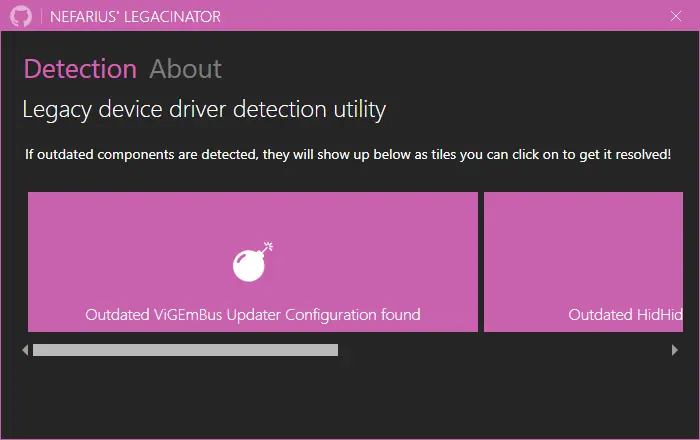
The official end-of-life statement describes a specific issue with older updater components. Old configurations contacted `updates.vigem.org`, a domain the publisher would no longer control after 2023. Continued contact could expose a user's public IP address to the later domain owner. The statement recommends adjusting old updater configuration or using the Nefarius Legacinator tool.
Final setup 1.22.0 removed the updater entirely. That is the preferred release for Windows 10/11 users who still need ViGEmBus. If you already have version 1.21.442 or older, upgrade to the final setup or follow the official updater-remediation instructions. Do not ignore an old updater warning simply because the controller itself works.
Why ViGEmBus may have appeared without a separate choice
Some controller applications bundle ViGEmBus and install it as a dependency. The official documentation acknowledges that software distributors may include the bus with or without a separate user-facing consent step. As a result, people sometimes discover it later in Installed apps and wonder whether it is unwanted software.
Look for DS4Windows, BetterJoy, InputMapper, XOutput, remote-play tools or other controller utilities. Review installation dates where Windows provides them. If you recognize a dependent program and use virtual controller output, the driver has a clear purpose. If no relevant software remains, normal uninstall is reasonable.
A bundled installation should still identify the legitimate publisher and device. If a program installed a modified copy, contact that distributor for support. Nefarius cannot guarantee how third-party installers package or update the driver.
When is ViGEmBus safe to keep or remove?
ViGEmBus is safe to keep when an active application depends on the verified final driver, Device Manager reports a healthy device and you understand the retired status. A legitimate working dependency does not become unsafe merely because it lacks a desktop interface.
Remove it when you no longer use virtual-controller software, when you have duplicate old entries or when the installed publisher/source cannot be verified. Use Windows Installed apps first. Uninstalling the bus may break virtual gamepad output but should not remove the normal driver for your physical controller.
If you are unsure, close controller applications and temporarily stop using their virtual-output features before removal. You can reinstall the final GitHub release later. A measured keep/remove decision is better than either trusting every file named ViGEmBus or treating every low-level driver as malicious.
| Situation | Reasonable decision |
|---|---|
| Verified 1.22.0 and app depends on it | Keep and monitor application compatibility |
| Old updater version | Upgrade or apply official updater remediation |
| No dependent software | Uninstall through Windows |
| Unknown signer or modified package | Remove, investigate and use the official source only |
| Multiple bus devices | Clean old copies and reinstall one verified version |
How to verify a safe ViGEmBus source
A safe ViGEmBus check is an evidence chain: the original Nefarius GitHub release, the expected file name, a consistent publisher and a valid Windows signature when available. A wrapper downloader or a mirror that claims a newer official version breaks that chain.
Retired does not automatically mean malware, but it does mean there is no promise of future fixes. Keep the final setup source, avoid disabling signature enforcement and review the client application’s privacy separately from the driver’s device role.
ViGEmBus safety FAQ
Is Nefarius Virtual Gamepad Emulation Bus Driver safe?
The authentic Nefarius driver is legitimate software. ViGEmBus is safe only when the GitHub source, file name and publisher match; the name alone cannot authenticate a file.
Why does ViGEmBus need administrator permission?
Windows requires elevated approval to install a kernel-mode device driver. That is normal for this function but should only be granted to the verified package.
Is an archived driver automatically unsafe?
No. Archived means it no longer receives updates. The risk is lack of future maintenance and, for older releases, the documented legacy updater configuration.
What is the safest ViGEmBus version to use?
For supported Windows 10/11 systems, use final setup 1.22.0 from the official GitHub release because it removed the old updater.
Should I trust a ViGEmBus antivirus exclusion guide?
Do not apply a blanket exclusion. Verify the exact official file and investigate the specific detection. Unknown or modified files should not be allowed merely because they use a familiar name.
Can ViGEmBus collect my controller data?
ViGEmBus provides the virtual device layer. Client applications decide what input to read and send. Review the privacy and source of the controller app as well as the driver.
Is an archived ViGEmBus release automatically unsafe?
No. Archive status explains support and update limits; it is not a malware verdict. Verify the original Nefarius source, file name and publisher, and do not treat an unofficial mirror as equivalent.
What should I check before opening the ViGEmBus installer?
Confirm the Nefarius GitHub release URL, the v1.22.0 EXE name and the publisher or signature details. Do not use a loose SYS file, a renamed mirror or instructions that disable Windows signature checks.
Official sources used
Product and safety facts on this page are checked against first-party material. External sources open in a new tab.
- Official ViGEmBus repository — source, license, publisher, purpose and supported systems
- Final v1.22.0 release — verified asset and updater removal
- Nefarius end-of-life statement — retirement, old updater risk and remediation