

Why ViGEmBus end of life happened
The official ViGEmBus end of life statement says a trademark conflict was discovered in May 2023. Nefarius Software Solutions and ViGEM GmbH agreed on a transition period from July through approximately December 2023, after which the ViGEm name and `vigem.org` domain were retired.
As a direct result, ViGEmBus and its client libraries stopped receiving updates and were archived. The original developer also explained that rebranding and continuing the project was not practical after years of largely solo maintenance. The GitHub repository remains accessible as an archive, so source code, documentation and release files did not disappear.
This was a planned retirement, not a malware takedown or sudden discovery that every driver installation was unsafe. The distinction matters: an installed final driver can continue serving a dependent application, but users should not expect new features, bug fixes or official support for future Windows changes.
| Milestone | Date | Meaning |
|---|---|---|
| Trademark conflict identified | May 2023 | Parties began planning a transition |
| Transition phase | July–December 2023 | ViGEm naming and domain use retired |
| Final setup 1.22.0 | November 2, 2023 | Updater removed; project says goodbye |
| vigem.org transfer completed | December 26, 2023 | Nefarius no longer controlled the old domain |
| Current state | Archived | Downloads remain, active maintenance ended |
What ViGEmBus end of life means for existing installs
ViGEmBus end of life does not include a remote switch that disables installed drivers. The official statement says the retirement has no impact on existing installations except for updater components that required adjustment. Applications can continue creating virtual controllers when the final driver remains compatible with their Windows version and client software.
The final release targets Windows 10 and Windows 11 across x86, amd64/x64 and ARM64. Windows Server is not officially supported. Older Windows 7 and 8.1 builds belong to the 1.16-era branch and no longer receive updates. macOS and Linux cannot use this Windows kernel driver.
Compatibility can still change after ViGEmBus end of life. A future Windows security or driver-model change, a controller application's migration to another backend, or a conflict with bundled legacy copies may affect behavior. When a client app has current documentation, treat that as the best source for whether it still expects ViGEmBus.
ViGEmBus end of life and the old updater risk
Some older ViGEmBus, HidHide and BthPS3 releases shipped with an updater that contacted a server under the old `vigem.org` domain. Because that domain would no longer belong to Nefarius after the transition, an unchanged updater could contact infrastructure controlled by someone else. The official statement identifies exposure of a public IP address to the later domain owner as the practical privacy concern.
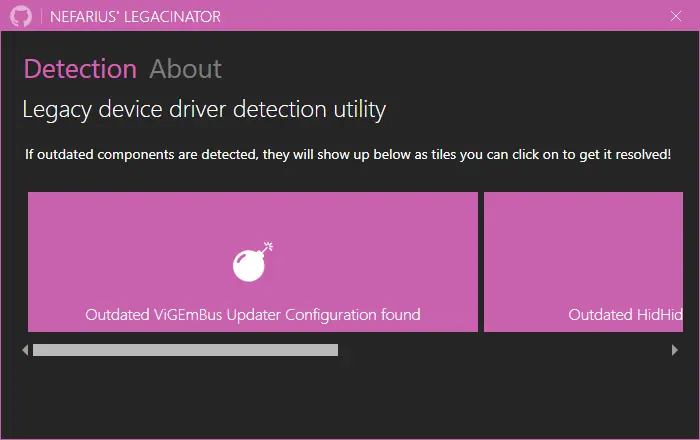
For ViGEm Bus Driver 1.21.442 or older on Windows 10/11, the official document offers two remediation paths: use Nefarius Legacinator to update the outdated configuration, or manually change the updater URL in `ViGEmBus_Updater.ini` from the old `updates.vigem.org` endpoint to the new Nefarius API endpoint.
Final setup 1.22.0 takes the cleaner path and removes the updater entirely. Its release notes explicitly say ‘Removed updater entirely.’ For most Windows 10/11 users who still need the driver, upgrading to 1.22.0 is easier to explain and verify than maintaining a historical updater.
Why ViGEmBus 1.22.0 is the final recommended setup
Version 1.22.0 is the last release in the official GitHub repository. Its all-in-one asset is named `ViGEmBus_1.22.0_x64_x86_arm64.exe`, covers the supported Windows architectures and removes the updater that created the EOL configuration concern.
The release notes also say the underlying driver version remains unchanged and that an in-place upgrade may require running setup twice. Therefore, do not assume an upgrade failed merely because Device Manager does not display 1.22.0 as the kernel driver version. Check the installed product, updater removal and device health together.
A site claiming a later official ViGEmBus release is not consistent with the archived repository as checked on July 20, 2026. A controller application may ship a fork or a different backend under another name, but that should not be presented as a new official ViGEmBus release without first-party evidence.
| 1.22.0 fact | Why it matters |
|---|---|
| Final GitHub release | Provides a stable official acquisition point |
| One x64/x86/ARM64 EXE | Avoids choosing old architecture-specific MSI packages |
| Updater removed | Eliminates the retired-domain updater behavior |
| Driver version unchanged | Setup version may not match Device Manager's driver number |
| Upgrade may need two runs | Documented maintenance behavior, not an invented workaround |
Choose an action after ViGEmBus end of life
Base the decision on the installed version, updater state and whether a current application still depends on the bus.
After ViGEmBus end of life, keep one healthy final installation only when an active app needs it. Download 1.22.0 from Nefarius GitHub, close dependent applications, run setup and reboot. An in-place upgrade may require a second run.
If you must retain an older installation, use the official EOL instructions to repair or remove its updater. Do not download a similarly named third-party updater utility. Legacinator is a separate Nefarius tool, and its role here is legacy updater detection/remediation rather than installing a new ViGEmBus driver.
If no software needs the virtual bus, uninstall Nefarius Virtual Gamepad Emulation Bus Driver through Windows Installed apps. Reboot and verify the bus is gone. Removal is often the simplest way to eliminate an unused retired dependency.
- 1
Identify whether an app still needs it
Review controller, streaming and remote-input software before removing the dependency.
- 2
Check the installed product
Look in Installed apps and Device Manager for Nefarius Virtual Gamepad Emulation Bus.
- 3
Upgrade old Windows 10/11 setups
Use final official release 1.22.0 to remove the legacy updater.
- 4
Remediate older updater configuration
When upgrade is not possible, follow the official Legacinator or manual instructions.
- 5
Uninstall when unused
Use the normal Windows uninstaller, reboot and verify removal.
ViGEmBus end of life and future support
After ViGEmBus end of life, do not expect security patches, new emulated controller types or responses to compatibility reports in the archived repository. The original issue tracker is not an active help desk. Community discussions may still be useful, but they do not turn an unofficial patch or binary into a publisher-supported release.
Watch the software that depends on ViGEmBus. A maintained controller application may publish migration instructions, replace the backend or continue using the archived driver. Follow its release notes before changing a working setup. Avoid installing multiple virtual-bus systems simultaneously unless the application documentation explains the combination.
For organizations or long-lived systems, ViGEmBus end of life makes this retired kernel dependency worth inventorying and testing. Record the official source, version, signer, dependent application and removal plan. That is a more useful risk control than treating the absence of active updates as either harmless or catastrophic.
ViGEmBus end-of-life FAQ
What does ViGEmBus end of life mean?
The project was retired and archived in 2023. Existing official releases remain downloadable, but no new fixes or support are promised.
Can I still use ViGEmBus 1.22.0?
Yes, when a current application needs it and it remains compatible with your Windows system. There will be no new project fixes.
What was wrong with the old updater?
Older configurations contacted a domain the publisher no longer controls. The official EOL statement recommends updater remediation to avoid contacting the transferred domain.
Does ViGEmBus 1.22.0 include an updater?
No. The final release notes state that the updater was removed entirely.
Is Legacinator the new ViGEmBus?
No. Legacinator is a Nefarius legacy-driver detection/remediation utility. It does not continue ViGEmBus development.
Should I uninstall ViGEmBus because it is retired?
Uninstall it when unused or unverifiable. If a trusted application still depends on one healthy final installation, retirement alone does not require immediate removal.
Official sources used
Product and safety facts on this page are checked against first-party material. External sources open in a new tab.
- Official ViGEm end-of-life statement — retirement timeline, domain transfer, updater risk and remediation
- ViGEmBus v1.22.0 release — final release notes and updater removal
- Archived ViGEmBus repository — current archived state and supported systems