

What Legacinator is designed to do
Legacinator is a Nefarius legacy-driver detection and remediation utility. Its purpose is to find older components that can remain on a Windows machine after a controller stack has been upgraded, renamed, or partially removed. That makes it a maintenance tool for a specific situation, not a general driver updater and not a system-wide security scanner.
The most relevant case for ViGEmBus users is an old updater configuration. Nefarius documented that some older packages could contact infrastructure associated with the retired vigem.org domain. Legacinator can help identify the old configuration so you can follow the official correction path. A newer final ViGEmBus setup may be a better answer when the machine still needs the bus.
The distinction matters because a tool that detects a legacy component does not automatically prove that every installed driver is broken. Read the detected item, compare it with the official documentation, and change only the component that matches the evidence. If you only want to remove an unused bus, use the normal [ViGEmBus uninstall guide](/uninstall-vigembus/) instead.
| Question | Practical answer |
|---|---|
| Is it a new ViGEmBus release? | No. It is a separate Nefarius maintenance utility. |
| Does it emulate a controller? | No. The virtual controller is provided by a driver and its client application. |
| Does it replace DS4Windows, BetterJoy or Sunshine? | No. Those applications have their own setup and support boundaries. |
| Is it a generic driver updater? | No. Treat its findings as targeted legacy-component remediation. |
| Should every user run it? | No. Use it when an official guide or a detected legacy state gives you a reason. |
What it may detect on an older Windows setup
Nefarius tools have been used alongside several virtual-controller and HID components over time. A machine can contain an older package even when the application that originally installed it has been removed. Leftover entries, updater settings, or duplicated driver packages can then make a later repair look more confusing than it needs to be.
A Legacinator result is a starting point for inspection. It can point you toward an outdated ViGEmBus updater configuration, old HidHide-related components, or other legacy Nefarius packages. The exact result depends on what is present on the machine, so do not turn a screenshot or a search snippet into a claim that your system has a particular problem.
Before running the utility, close controller mappers, remote-play hosts, game launchers and other software that may be using the virtual bus. Create a restore point or another recovery option when the machine is important. Save the original download source and version in your notes so a later support request has a reproducible starting point.
- An old updater configuration associated with a retired endpoint.
- Legacy virtual-controller or HID packages left by an older setup.
- Duplicate or partially removed components that deserve a second look.
- A remediation path that should be compared with current Nefarius documentation before you apply it.
Legacinator download facts and the verified file
The latest release checked for this page is v1.12.3, published on October 22, 2025. The official release provides one executable named `Legacinator.exe`. The GitHub asset is 4,149,728 bytes, or about 3.96 MB, and the verified release asset responded with HTTP 200 and a matching Content-Length when checked on August 22, 2026.
Use the button on this page only as a shortcut to that official GitHub asset. The file is served by GitHub, not mirrored by ViGEmBus Download Wiki. A direct release URL is preferable here because it is stable, contains no session token, and can be compared with the asset metadata shown by the official repository.
Windows may show SmartScreen or elevation prompts for a utility that inspects driver state. That prompt is not a reason to disable Windows security controls. If the file name, publisher context, release tag, or download source does not match the facts above, stop and obtain the file again from the official release page.
| Verified fact | Value |
|---|---|
| Release | v1.12.3 |
| Published | October 22, 2025 |
| File | Legacinator.exe |
| Size | 4,149,728 bytes (about 3.96 MB) |
| Source | Nefarius GitHub release asset |
| Use | Windows legacy-driver detection and remediation |
Safe-use boundaries: what Legacinator does not promise
Legacinator is not a certificate that a system is safe, clean, or compatible with every controller program. It does not turn an archived ViGEmBus project into an actively maintained driver. It also does not give this website permission to call a third-party mirror official. The correct safety boundary is source verification, a narrow change, and a test after the change.
Do not download a renamed `Legacinator.exe`, a loose SYS file, a random MSI, or a driver-updater bundle that claims to include Legacinator. Do not disable driver-signature enforcement, antivirus protection, SmartScreen, or Windows security features to make an unknown package run. If a repair requires that kind of workaround, you have left the official remediation path.
The illustration below is a conceptual editorial graphic. It shows the decision pattern—inspect, compare, remediate, verify—not an automatic promise that every machine reaches the clean state shown.

How to use Legacinator without widening the problem
Start with the reason you are opening the tool. If an official Nefarius document, an older updater warning, or a controller application points to a legacy component, write down the symptom and current installed versions. If the only symptom is that you no longer need ViGEmBus, skip Legacinator and use the standard Windows removal path.
Download the verified executable, keep the release page in your notes, and close programs that create or read virtual controllers. Run the utility with the least privilege that still lets it inspect the required state. If Windows asks for elevation, confirm the file source before accepting rather than treating elevation as a reason to trust a file.
Read each detected tile or message before taking action. A remediation option should have a clear relationship to the legacy item. Avoid clicking every available action simply because it is present. When a result is unclear, stop, capture the exact wording for support, and compare it with the official Nefarius documentation.
After the change, restart when the documentation or Windows requires it. Test the application that originally needed the virtual bus, then check Device Manager and Installed apps. A clean result is not just an empty warning; it is a working, explainable driver state with no unexpected duplicate components.
- 1
Identify the dependency
Record which controller, streaming or remote-input app needs the virtual bus, if any.
- 2
Verify the source
Use the official v1.12.3 GitHub release and compare the file name and size.
- 3
Close active clients
Exit controller mappers, games and streaming hosts before inspecting legacy components.
- 4
Apply only the matching remediation
Read the detected item and follow the official step that addresses that item.
- 5
Restart and verify
Test the dependent application, Device Manager and Installed apps after the change.
Using Legacinator for an old ViGEmBus updater configuration
The Nefarius ViGEm end-of-life statement describes a specific older-updater concern: some legacy packages could contact a domain that Nefarius no longer controlled after the transition. The recommended answer is not to panic or delete every driver. It is to remove the old updater behavior by using the documented remediation path or by moving to the final ViGEmBus setup when the application still needs the bus.
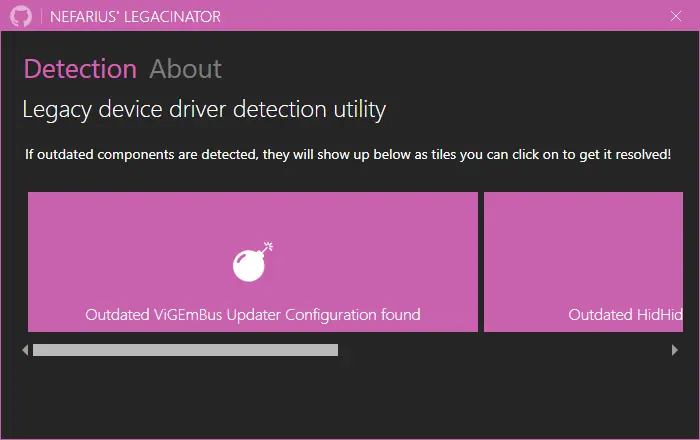
The official screenshot below shows the kind of legacy-updater detection that the EOL documentation discusses. It is useful as a recognition aid, but it does not prove that your machine has the same state. Match the product, version and configuration on your own system before applying a change.
For many Windows 10 and 11 users, installing the final ViGEmBus v1.22.0 package is easier to verify because the release removed the legacy updater entirely. If the bus is unused, the safer answer may be a normal uninstall. Read the [ViGEmBus end-of-life guide](/vigembus-end-of-life/) and [official safety guide](/is-vigembus-safe/) before choosing between those paths.
What to check after the run
Open Installed apps and Device Manager and confirm that the component you intended to change is the component that changed. Do not expect the release number of Legacinator or the ViGEmBus setup package to appear as the kernel driver version. Product version, driver version, provider and device status are related facts, not interchangeable labels.
Launch the dependent application and test one real controller path. For a remote-play stack, test the host and client separately. For a local mapper, confirm that one expected virtual controller appears and that duplicate physical-plus-virtual input has not been introduced. If a client still reports that ViGEmBus is missing, use the [installation guide](/how-to-install-vigembus/) and [not-installed troubleshooting page](/vigembus-not-installed/) rather than repeatedly running cleanup tools.
If you no longer need the bus, remove it normally and keep a note of what depended on it. If the result is ambiguous, preserve the exact message, release version and source URL. That information is more useful than trying several third-party utilities with overlapping names.
Nefarius Legacinator FAQ
Is Legacinator the new ViGEmBus?
No. Legacinator is a separate Nefarius utility for detecting and remediating legacy driver or updater states. It does not continue ViGEmBus development and it does not install a new virtual-controller bus.
Where should I download Legacinator?
Use the official Nefarius GitHub release. The verified v1.12.3 asset is named Legacinator.exe and was checked at 4,149,728 bytes on August 22, 2026. This site links to GitHub instead of hosting a mirror.
Do I need to install Legacinator?
The release is distributed as a single executable. Treat it as a targeted maintenance utility, not a background service or a replacement for the ViGEmBus installer.
Can Legacinator remove every old driver?
Do not assume that. Read each detected item and follow the official remediation path. Removing an active dependency can break a controller, streaming or remote-input application.
Should I use Legacinator or uninstall ViGEmBus?
Use Legacinator when an official warning or detected legacy configuration calls for remediation. If the bus is unused, the normal uninstall guide is usually the clearer path.
What if SmartScreen or antivirus blocks the file?
Do not disable security controls for an unknown copy. Recheck that the download came from the official v1.12.3 GitHub release, compare the name and size, and use the release page or official documentation for a decision.
Official sources used
Product and safety facts on this page are checked against first-party material. External sources open in a new tab.
- Official Legacinator repository — purpose, source and current project information
- Legacinator v1.12.3 release — verified release tag and official executable asset
- Nefarius ViGEm end-of-life statement — legacy updater risk and remediation context
- ViGEmBus final release — final setup and updater removal when the bus is still required