
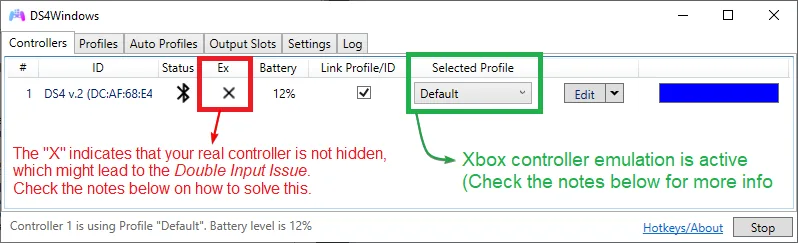
Why DS4Windows uses ViGEmBus
DS4Windows reads the physical controller; ViGEmBus creates the virtual controller presented to games.
A DualShock 4 or DualSense can connect without ViGEmBus, but many games expect XInput. DS4Windows translates the physical input and asks ViGEmBus to expose a virtual Xbox 360 or DualShock 4 device.
Check three layers separately: the physical controller, the active DS4Windows profile and output type, and the ViGEmBus device in Windows. This prevents unnecessary driver reinstalls.
| Layer | Role | Typical failure |
|---|---|---|
| Physical controller | Sends buttons and sticks to DS4Windows | Controller absent from DS4Windows |
| DS4Windows profile | Maps input and selects Xbox 360 or DS4 output | Detected pad but no virtual output |
| ViGEmBus | Creates the Windows virtual controller | Bus missing, damaged or duplicated |
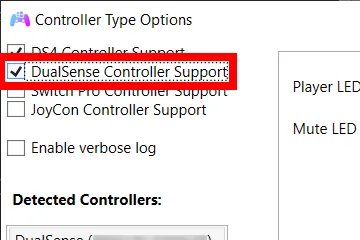
How to install ViGEmBus for DS4Windows
Use the final official ViGEmBus v1.22.0 asset from the original nefarius GitHub repository. The file is ViGEmBus_1.22.0_x64_x86_arm64.exe, approximately 6.0 MB, and combines the supported installer architectures. The project is retired, so this is the last published release rather than an actively updated driver.
Keep diagnosis focused on the physical controller, active profile, virtual output slot, and ViGEmBus device. A failure at one layer does not prove the others need reinstalling.
- 1
Close DS4Windows and active clients
Close DS4Windows and other controller-mapping tools before changing the driver.
- 2
Run the official installer
Open the verified v1.22.0 GitHub asset and confirm the Nefarius publisher.
- 3
Restart Windows
Reload the bus driver in a clean Windows session.
- 4
Start DS4Windows and reconnect
Launch DS4Windows after reboot, reconnect the client and test controller input.
Verify that DS4Windows can use the ViGEmBus driver
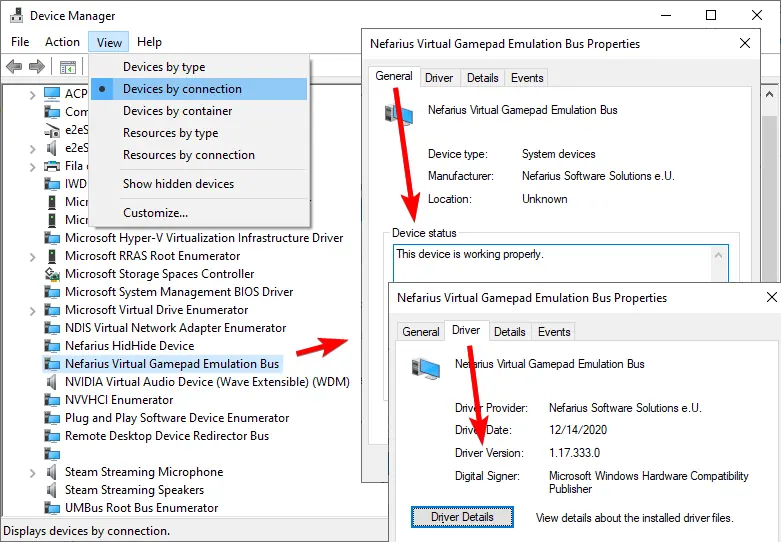
Open Device Manager and find Nefarius Virtual Gamepad Emulation Bus. Open Properties and confirm Device status says the device is working properly. This is the strongest check that the kernel bus exists and is operational.
Also check Settings > Apps > Installed apps for the Nefarius driver entry. If the app entry exists but Device Manager has no working bus, the package is registered but the kernel device still needs repair.
- No warning icon appears on the Nefarius bus.
- Device status reports normal operation.
- DS4Windows started after the latest reboot.
- The active profile requests an Xbox 360 or DualShock 4 output controller.
Fix DS4Windows not detecting ViGEmBus
Keep diagnosis focused on the physical controller, active profile, virtual output slot, and ViGEmBus device. A failure at one layer does not prove the others need reinstalling.
DS4Windows ViGEmBus error matrix
Choose the smallest repair that matches the symptom. DS4Windows only needs a restart in some cases, while a missing kernel device requires driver repair.
| Symptom | Likely cause | Next step |
|---|---|---|
| DS4Windows says ViGEmBus is not installed | Driver missing or DS4Windows started before reload | Reboot, verify Device Manager, restart DS4Windows |
| Driver listed but gamepad fails | Stale session or tool conflict | Close controller tools and restart DS4Windows |
| Yellow warning icon | Damaged driver/device state | Uninstall, reboot, reinstall v1.22.0 |
| Two controllers in game | Physical and virtual pads both exposed | Review hiding and mapping settings |
| Installer offers remove/repair | Existing package registered | Use normal repair/removal, reboot, install once |
What not to do when DS4Windows gamepad support fails
Do not assume a new DS4Windows build requires an unofficial ViGEmBus fork. DS4Windows changes independently, while the original ViGEmBus repository is archived. Use the verified final driver unless DS4Windows's current official notes explicitly require something else.
Do not delete every Nefarius or HID-related device. HidHide, Bluetooth adapters, physical pads and virtual buses have different jobs. Broad deletion can turn one DS4Windows issue into a larger controller problem.
- Do not use a similarly named EXE from a mirror.
- Do not mix an old MSI with the final EXE.
- Do not skip the reboot between removal and reinstall.
- Do not treat an DS4Windows web-login problem as a ViGEmBus problem.
Final checklist before testing DS4Windows again
Keep diagnosis focused on the physical controller, active profile, virtual output slot, and ViGEmBus device. A failure at one layer does not prove the others need reinstalling.
If the virtual controller works in Windows but not in one game, ViGEmBus is probably functioning. Check that game's controller mode, Steam Input, focus and supported controller type before reinstalling the driver again.
- Official ViGEmBus 1.22.0 installed from nefarius/ViGEmBus.
- Windows restarted after installation or removal.
- The Nefarius bus works in Device Manager.
- DS4Windows restarted after the driver became available.
- Only one intended virtual controller appears during testing.
DS4Windows and ViGEmBus FAQ
Does DS4Windows install ViGEmBus automatically?
DS4Windows packaging may include or reference controller dependencies, but verify the Windows driver independently. This guide uses the final official ViGEmBus 1.22.0 release as the known source.
Why does DS4Windows say ViGEmBus is not installed after installation?
DS4Windows may have started before the driver loaded, Windows may need a reboot, or a duplicate/damaged bus may exist. Verify Device Manager, reboot, then restart DS4Windows.
Can DS4Windows work without ViGEmBus?
DS4Windows can detect the physical pad without ViGEmBus, but creating the virtual Xbox 360 or DualShock 4 output requires a compatible virtual bus.
Should I downgrade ViGEmBus for DS4Windows?
Do not downgrade by default. Use the final official v1.22.0 release unless DS4Windows's current official documentation explicitly requires another version.
Is this a direct installer link?
Yes. The button points to the verified GitHub release asset from nefarius/ViGEmBus, not a mirror or repackaged installer.
Official sources used
Product and safety facts on this page are checked against first-party material. External sources open in a new tab.
- DS4Windows install and setup documentation — controller support and profile output
- DS4Windows controller troubleshooting — physical and virtual controller diagnosis
- ViGEmBus v1.22.0 official release — final release and verified installer
- Nefarius ViGEm end-of-life notice — retirement context